
How It Works
Heat, hot water and smart controls. The whole Van Life Tech system, start to finish.
One System: Floor Heat, Air Heat and Domestic Hot Water.
Our proprietary design provides whole-van heating through a fully integrated Two Stage Hydronic System, managed by our in-house designed and programmed Van Life Tech Integration Controller. You set the temperature – the System takes care of the rest.
Stage I · Radiant Floor
The controller fires the boiler and warms the floor first. Your installer sets a floor minimum and maximum (say 65°F and 90°F), so the floor stays warm and your flooring stays safe while the air comes up to your set point.
Stage II · Fan Coil Boost
If the air is more than 2°F away from your set point for more than 10 minutes, the controller turns on the hydronic fan coil(s) to bring the air temperature up fast. Then the floor takes over again.
Hot Water · On Demand
Tankless, on-demand domestic hot water, limited only by the size of your freshwater tank. A heat exchanger moves heat from the system fluid to your potable water. The two never mix.
Under the Hood
Runs on Your Van’s Fuel
Proven commercial-vehicle boilers burn your van’s own diesel or gasoline: 0.07 to 0.16 gallons per hour while heating, or about ½ gallon in 24 hours (insulation matters most).
Light on Batteries
Pumps, controls and the boiler itself draw about 30–70 watts of DC power. No inverter needed.
Safe Working Fluid
A non-toxic, food-grade propylene glycol solution, in its own sealed loop, separate from your engine coolant.
Sensors Everywhere
Indoor, outdoor and in-floor sensors let the controller hold your floor limits and air set point while it watches the weather outside.
Smart Controls
The Tech That Keeps You Warm
PID, VSD, Injection Pumping, Boiler Minimum and Maximum Run Times, Latent Heat Usage, Indoor/Outdoor/Floor Temperature Feedback, Freeze Protection, Two Stage Heating — you don’t need to know what any of this means.
You get to Set It & Forget It (to the temperature you want it to be), and we’ll take care of the heavy lifting.
Rest easy (and warmly) knowing our control algorithm comes from 25+ years in high-end hydronic heating system design.
Try The Thermostat
Tap ▲ ▼ to set the temperature. Swipe, or tap the dots, to see the floor and outdoor readings. Set it once, run it on a 7-day schedule, or change it from your phone over WiFi.
Go ahead, try it →
Set It & Forget It.
Explore the VLT Touchscreen Thermostat.

Tap ▲ / ▼ to adjust Heat To. Swipe the upper display or tap the three dots to view Heat To · Outdoor · Floor. The large number always shows actual indoor temperature.
Hot Water. One Button.
Set It & Forget It. Try the push-button, on-demand hot water control.
Hold for 1 second to start. During a cycle, tap to add 20 minutes, or hold for 3 seconds to cancel. The cycle ends automatically.
Hot Water at the Push of a Button.
Press and hold a Domestic Hot Water (DHW) button at any installed location until it lights red, then let go. The system starts a 20-minute hot-water generation cycle and directs the boiler’s full btu output to tankless hot water generation. No storage tank, no wet screen menus.
Try the button →
One Button to Rule Them All. One Button or Many.
Put a waterproof hot-water button anywhere in your build, even inside the shower. One press starts a timed hot-water cycle, additional presses extend it. Unlike a plain on/off switch, it never overrides the Van Life Tech controller’s BoilerCare™ algorithms and it can’t accidentally be left on. Integrating an Infinity Shower®? Use this option. Our Vertical Bath™, is of course — fully integrated by design.
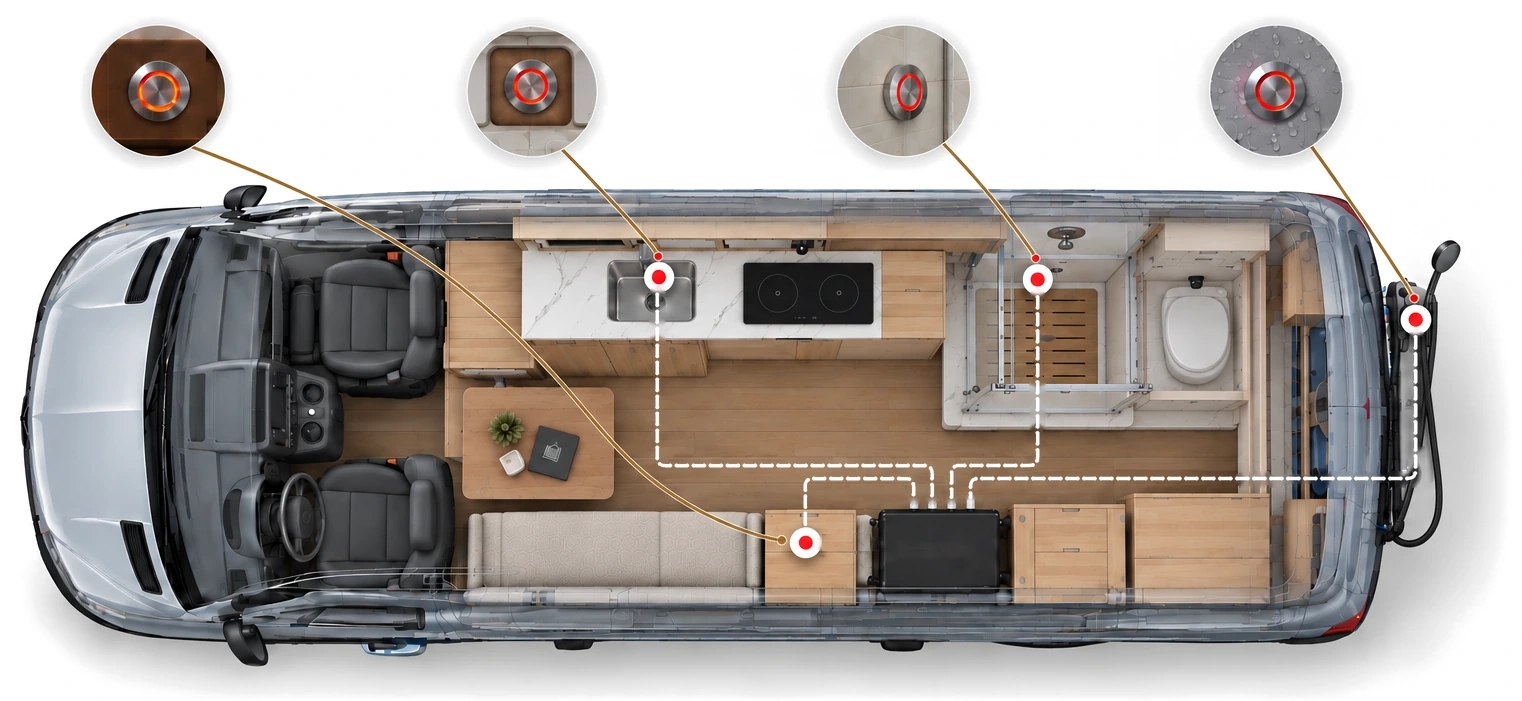
Press for Hot Water
Press and hold any button until it lights red, then let go. A 20-minute hot water cycle starts, and the button slowly flashes red while it runs.
Need More Time?
Press again to add another 20 minutes. Done early? Hold for 3 seconds to cancel.
Automatic Shut-Off
Every cycle is timed. When it ends, the system returns to space heating if the thermostat is calling for heat, or goes back to standby. No wasted boiler cycles.
Set It & Forget It
No menus, no screens, no remembering to switch it off. Hot water is one press away, even with wet hands.