
How It Works
Heat, hot water and smart controls. The whole Van Life Tech system, start to finish.
One System: Floor Heat, Air Heat and Domestic Hot Water.
Our proprietary design provides whole-van heating through a fully integrated Two Stage Hydronic System, managed by our in-house designed and programmed Van Life Tech Integration Controller. You set the temperature. The system decides how to get there.
Stage I · Radiant Floor
The controller fires the boiler and warms the floor first. Your installer sets a floor minimum and maximum (say 65°F and 90°F), so the floor stays warm and your flooring stays safe while the air comes up to your set point.
Stage II · Fan Coil Boost
If the air is more than 2°F away from your set point for more than 10 minutes, the controller turns on the hydronic fan coil(s) to bring the air temperature up fast. Then the floor takes over again.
Hot Water · On Demand
Tankless, on-demand domestic hot water, limited only by the size of your freshwater tank. A heat exchanger moves heat from the system fluid to your potable water. The two never mix.
Under the Hood
Runs on Your Van’s Fuel
Proven commercial-vehicle boilers burn your van’s own diesel or gasoline: 0.07 to 0.16 gallons per hour while heating, or about ½ gallon in 24 hours (insulation matters most).
Light on Batteries
Pumps, controls and the boiler itself draw about 30–70 watts of DC power. No inverter needed.
Safe Working Fluid
A non-toxic, food-grade propylene glycol solution, in its own sealed loop, separate from your engine coolant.
Sensors Everywhere
Indoor, outdoor and in-floor sensors let the controller hold your floor limits and air set point while it watches the weather outside.
Smart Controls
The Tech That Keeps You Warm
PID, VSD, Injection Pumping, Boiler Minimum and Maximum Run Times, Latent Heat Usage, Indoor/Outdoor/Floor Temperature Feedback, Freeze Protection, Two Stage Heating — you don’t need to know what any of this means.
You get to Set It & Forget It (to the temperature you want it to be), and we’ll take care of the heavy lifting.
Rest easy (and warmly) knowing our control algorithm comes from 25+ years in high-end hydronic heating system design.
Try The Thermostat
Tap ▲ ▼ to set the temperature. Swipe, or tap the dots, to see the floor and outdoor readings. Set it once, run it on a 7-day schedule, or change it from your phone over WiFi.
Go ahead, try it →
Set It & Forget It.
Explore the VLT Touchscreen Thermostat.

Tap ▲ / ▼ to adjust Heat To. Swipe the upper display or tap the three dots to view Heat To · Outdoor · Floor. The large number always shows actual indoor temperature.
Hot Water. One Button.
Set It & Forget It. Try the push-button, on-demand hot water control.
During a cycle, tap to add 20 minutes, or hold for 3 seconds to cancel. The cycle ends automatically.
Tankless On-Demand Hot Water. At the Push of a Button.
Press and hold any hot-water button until it lights red, then let go. The system starts a 20-minute hot-water cycle, pauses space heating, and sends the boiler’s full output to your hot water.
Hot water works completely independently of the space-heating thermostat. Your thermostat can be in Heat Off mode, or even disconnected, and hot water is still there.
Try the button →
One Button. Or Several. Wherever You Want Them.
Hot-water buttons can go anywhere in your build: at the main control station, beside the kitchen sink, inside the shower, or at an outdoor shower. Connect as many as you like; they all run the same hot-water system.
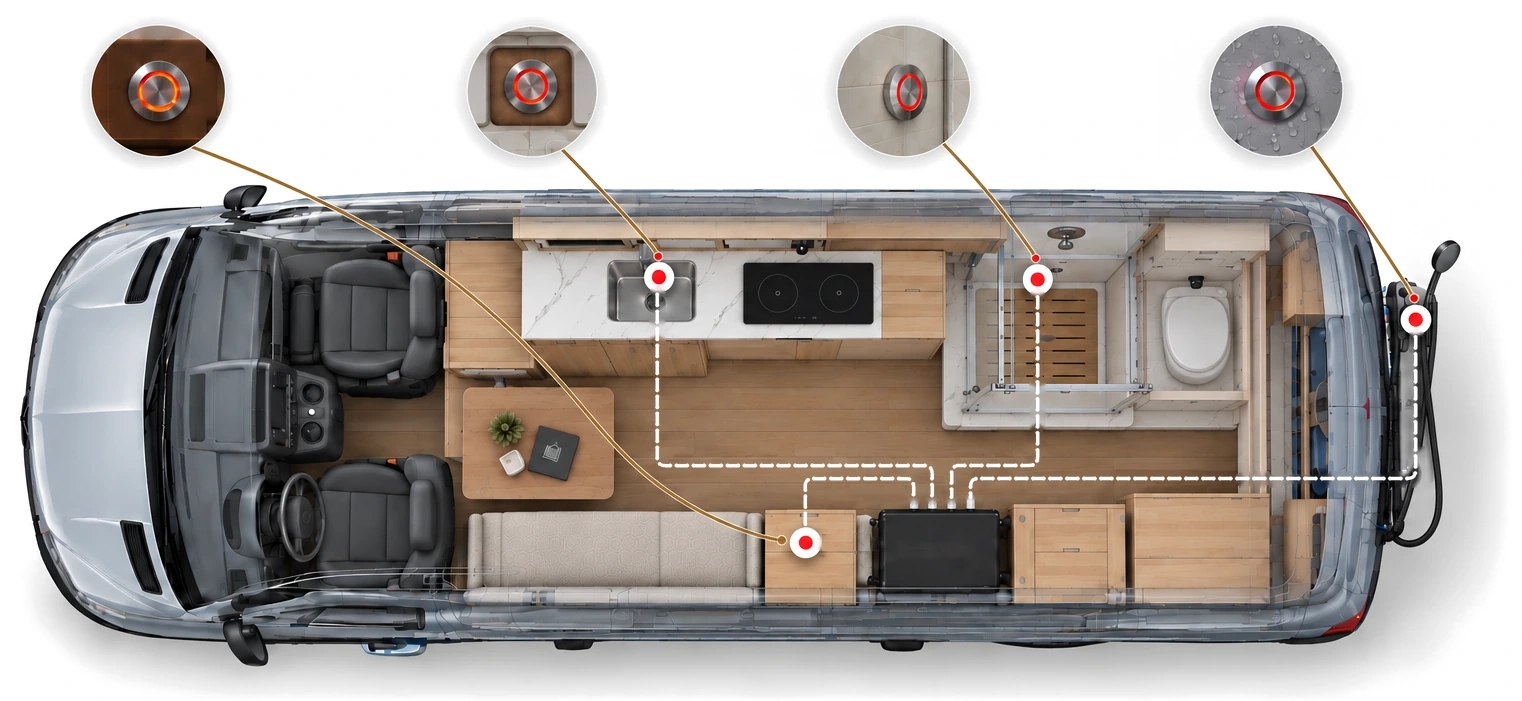
Press for Hot Water
Press and hold any button until it lights red, then let go. A 20-minute hot water cycle starts, and the button slowly flashes red while it runs.
Need More Time?
Press again to add another 20 minutes. Done early? Hold for 3 seconds to cancel.
Automatic Shut-Off
Every cycle is timed. When it ends, the system leaves hot-water priority and goes back to normal heating. No wasted boiler cycles.
Set It & Forget It
No menus, no screens, no remembering to switch it off. Hot water is one press away, even with wet hands.